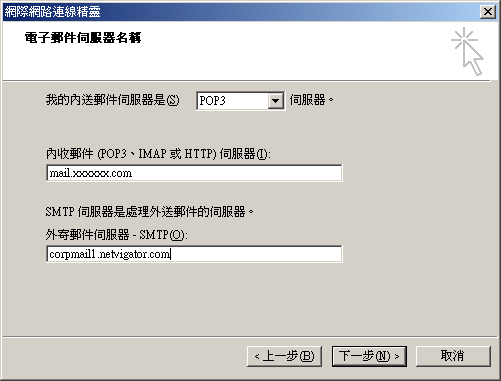
Choose "POP3"
at "Incoming Mail Server".
Field in "mail.xxxxx.com"
at the field of "Incoming Mail".
Field in "corpmail1.netvigator.com"
at the field of "Outgoing Mail".
Then click "Next"
* * * The "xxxxxx"
in "mail.xxxxx.com" can retrieve in the information
letter (or email) which is provided by i-conson.
* * * Please fill in your ISP's
smtp server address in Outgoing Mail Server, here is
the example for the client which using PCCW as the ISP.
在內送郵件伺服器中選擇 "POP3".
在內送郵件伺服器的空格中填入 "mail.xxxxxx.com"
在外寄郵件伺服器的空格中填入 "corpmail1.netvigator.com"
然後按下一步
* * * "mail.xxxxx.com"
中的 "xxxxxx" 可跟據我們提供給客戶的指引信件(或電郵)中獲得.
* * * 請在外寄郵件伺服器一欄中填寫你的互聯網供應商提供的伺服器名稱. |