Web Disk 網路磁碟
For convenience purpose, we can use Microsoft Windows Explorer to connect to our FTP Server to perform a web disk function.
基于方便的理由, Microsoft Windows 內的檔案總管可以利用作網路磁碟功能.
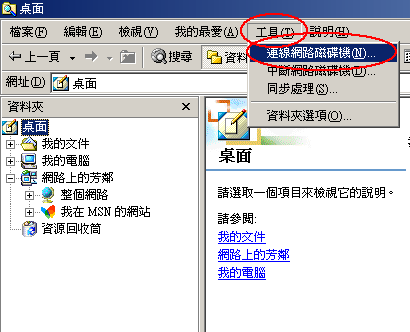
First of all, open Microsoft Windows Explorer. Then click "Tools" - > "Map Network Drive".
首先, 開啟檔案總管. 然後按 "工具" - > "連線網路磁碟機".
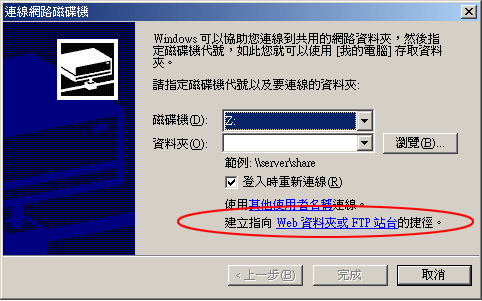
Then click "Sign up for online storage or connect to a network server."
然後按 "建立指向 Web 資料夾或 FTP 站台 的捷徑" .
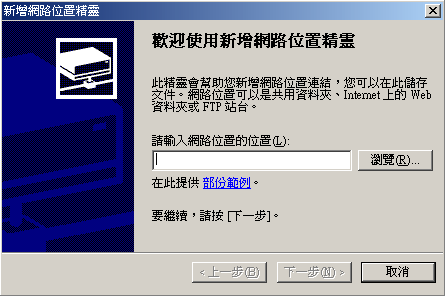
Then fill in the blank with the location of our FTP Server.
然後在空格輸入FTP 伺服器地址.
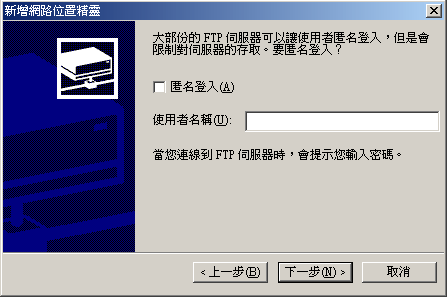
Then type in your login in name.
然後輸入你的登入名稱.
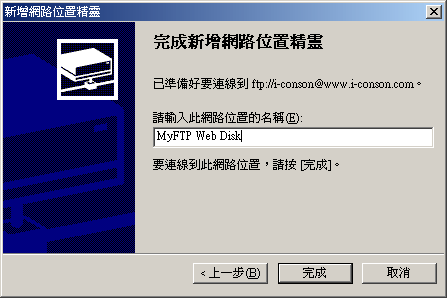
Then type a name for this Web Disk.
然後為你的 "網路磁碟" 輸入名稱.
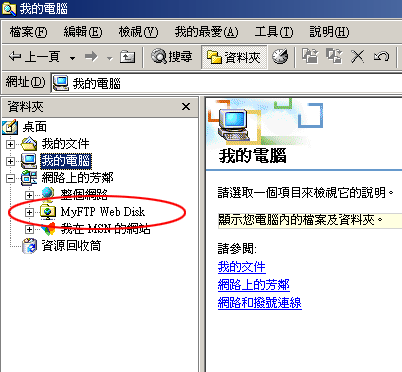
Then you will see a Web Disk Icon display in the "My Network Places".
然後你可以在 "網路上的芳鄰" 內見到網路磁碟的